
Fix SQL Server Error 823, 824 and 825
Error 823 means Windows failed an I/O call on a database page and SQL Server cannot continue the query. Errors 824 and 825 belong to the same family and point to a storage problem.
These errors damage data when you ignore them. This guide explains the three errors and five steps that protect your database in the right order.
Quick SummaryError 823 means Windows failed a page I/O call. Error 824 means SQL Server found a bad page. Error 825 warns of an I/O call that needed a retry. Check suspect pages and execute DBCC CHECKDB. Fix the disk and the driver first. Restore the damaged page or the full backup. Use SQL Recovery when no backup exists. Copy the files before any repair.
What Do Errors 823, 824 and 825 Mean in SQL Server?
According to Microsoft, error 823 is a severe system level I/O error. SQL Server reports it when a Windows file call like ReadFile or WriteFile fails with an operating system error. Its message names the file and the byte offset. Divide the offset by 8,192 to get the logical page number.
| Error | Meaning | Who finds the fault |
|---|---|---|
| 823 | The file call failed with an operating system error. | Windows |
| 824 | The I/O succeeded but the page content failed a logical check like checksum or torn page. | SQL Server |
| 825 | The first attempt failed and a retry succeeded. SQL Server retries up to 4 times before it raises 823. | SQL Server |
- Failing disk or controller. Bad sectors and cable faults return I/O errors.
- Driver and firmware faults. Old drivers return wrong data with a success code.
- Filter drivers. Antivirus and backup agents sit in the I/O path and modify reads.
- Unstable storage. A network share or a SAN that goes offline breaks the call.
Do You Know?Error 825 never fails your query. SQL Server writes it to the error log and the Windows Event log as an early sign of storage trouble. Treat it with the same care as error 823.
How to Find the Damaged Pages Behind Error 823?
Open the full error text in the SQL Server log first. It shows the file, the offset and the Windows error code. Then check the suspect pages table and the page verify setting.
-- Pages SQL Server marked as damaged
SELECT database_id, file_id, page_id, event_type, error_count, last_update_date
FROM msdb.dbo.suspect_pages
WHERE event_type IN (1, 2, 3);

-- Databases that do not use page checksums
SELECT name, page_verify_option_desc
FROM sys.databases
WHERE page_verify_option_desc <> N'CHECKSUM';
Note the file number and the page number of every row. Method 3 needs them.
How to Fix Error 823 in SQL Server?
Try the methods in this order. Every example uses the database SalesDB and the folder D:\Backups. Replace the names with your own values.
Method 1: Check the Database With DBCC CHECKDB
Microsoft advises DBCC CHECKDB on the affected database and on every database on the same volume. Execute it even before you see corruption. Open how to check the integrity of a SQL Server database for the full option list.
DBCC CHECKDB (SalesDB) WITH NO_INFOMSGS, ALL_ERRORMSGS;Clean results mean the I/O error did not damage a page. Move on to Method 2 to find the storage fault.
Method 2: Fix the Storage and Driver Fault
Review the Windows Event logs for disk, controller and driver errors and fix those first. Microsoft names five more checks.
- SQLIOSim. The tool ships with SQL Server and tests the I/O path outside normal workloads.
- Drivers and firmware. Update both and check the virtualization drivers on a virtual machine.
- Filter drivers. List them with fltmc filters and test the server with one filter disabled.
- Antivirus. Exclude the MDF, NDF and LDF files from scanning.
- Page checksums. Set page verify to CHECKSUM so SQL Server detects damaged pages early.
ALTER DATABASE SalesDB SET PAGE_VERIFY CHECKSUM;Method 3: Restore the Damaged Pages From Backup
Use this method when DBCC CHECKDB reports a few damaged pages. Page restore needs the full or bulk logged recovery model and an unbroken chain of log backups. Replace 1:57 with the file number and the page number from suspect_pages.
RESTORE DATABASE SalesDB PAGE = N'1:57'
FROM DISK = N'D:\Backups\SalesDB_Full.bak'
WITH NORECOVERY;

RESTORE LOG SalesDB FROM DISK = N'D:\Backups\SalesDB_Log1.trn' WITH NORECOVERY;

BACKUP LOG SalesDB TO DISK = N'D:\Backups\SalesDB_Tail.trn';
RESTORE LOG SalesDB FROM DISK = N'D:\Backups\SalesDB_Tail.trn' WITH RECOVERY;
Log restores follow the order in restore database with NORECOVERY.
Method 4: Restore the Last Good Full Backup
Restore the full backup when many pages are damaged or the storage returned bad data for weeks. Microsoft names a restore from a known good backup as the answer when the hardware is healthy and damage remains.
RESTORE VERIFYONLY FROM DISK = N'D:\Backups\SalesDB_Full.bak';

RESTORE DATABASE SalesDB
FROM DISK = N'D:\Backups\SalesDB_Full.bak'
WITH REPLACE, RECOVERY, STATS = 10;
Heads UpDo not use REPAIR_ALLOW_DATA_LOSS before you copy the database files and test the disk. Repairs delete damaged rows for good. Follow DBCC CHECKDB repair failures when the command fails and use page level corruption fixes for single page faults.
Method 5: Recover the MDF File With SQL Recovery
Use this method when no usable backup exists. SQL Recovery scans the damaged MDF and NDF files without SQL Server, previews the tables, views, triggers, rules, functions and stored procedures and exports them. SQL Recovery brings back deleted records and works with suspect and recovery pending databases. Copy the files to a healthy disk before the scan.
Download SQL Recovery Buy SQL Recovery
- Install SQL Recovery and select Add File.
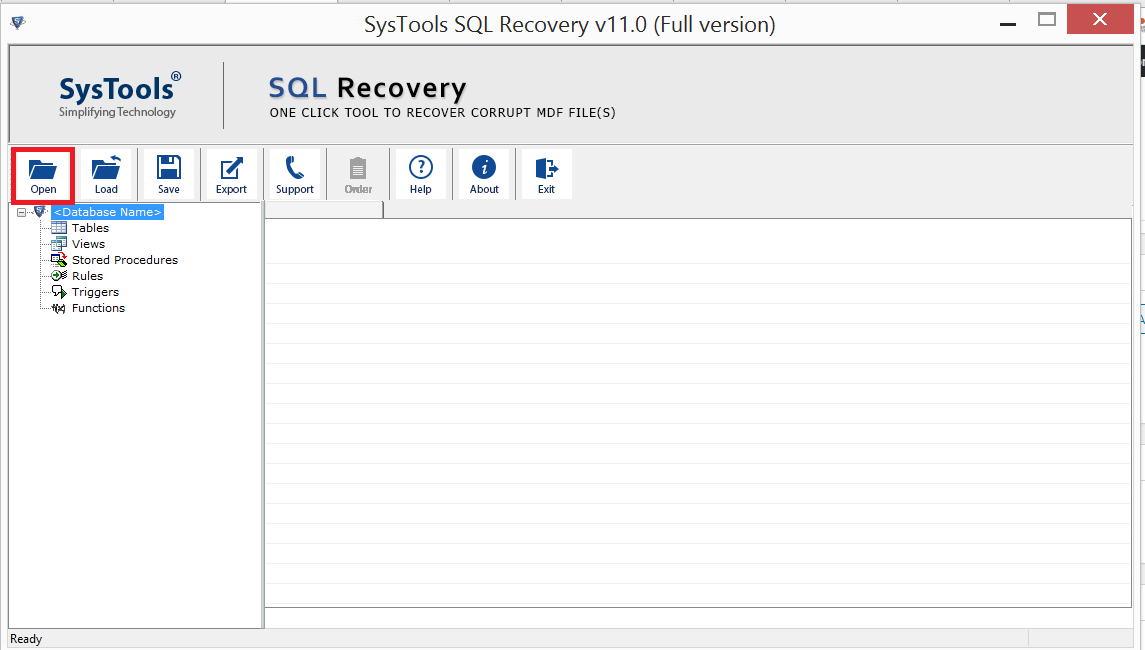
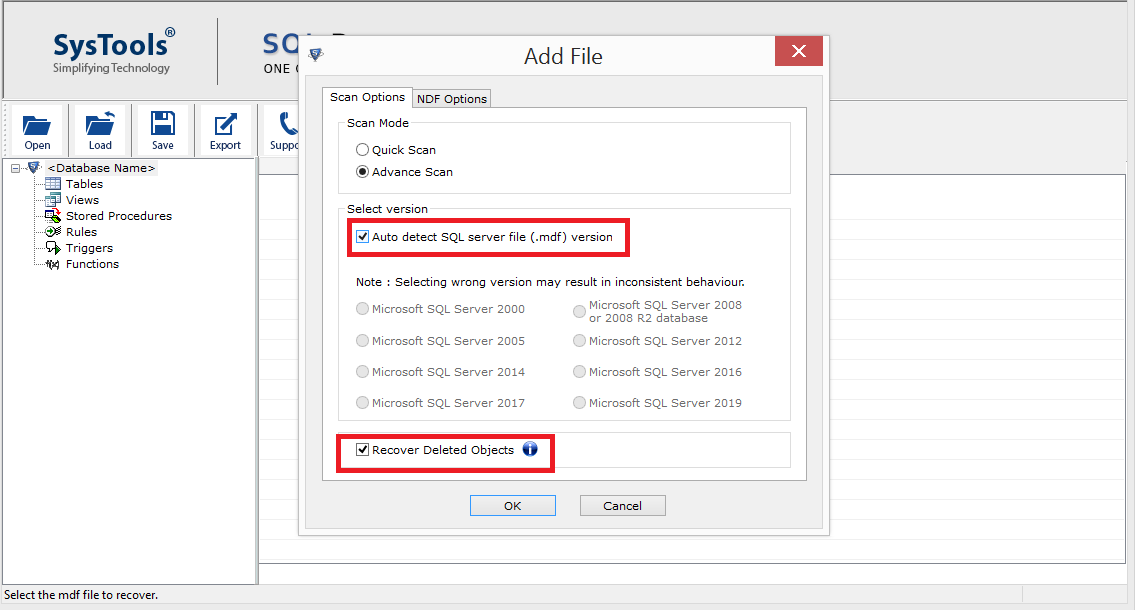
- Browse to the MDF file and select Advanced Scan. Confirm the SQL Server version and tick the deleted records option.
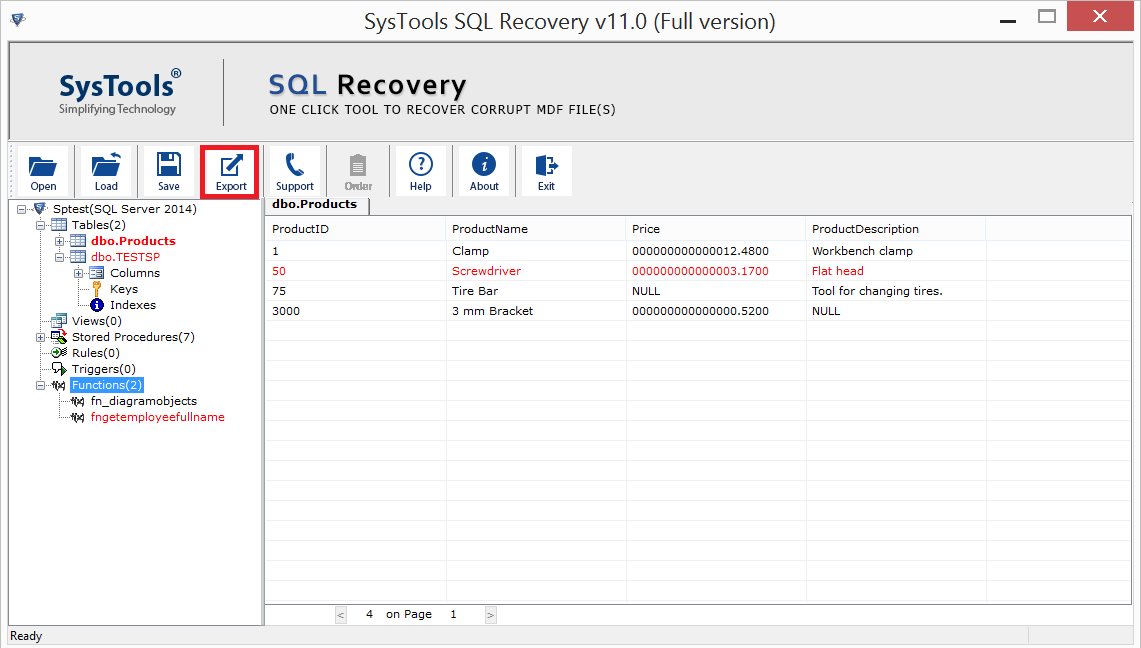
- Open the preview and check the recovered database components.
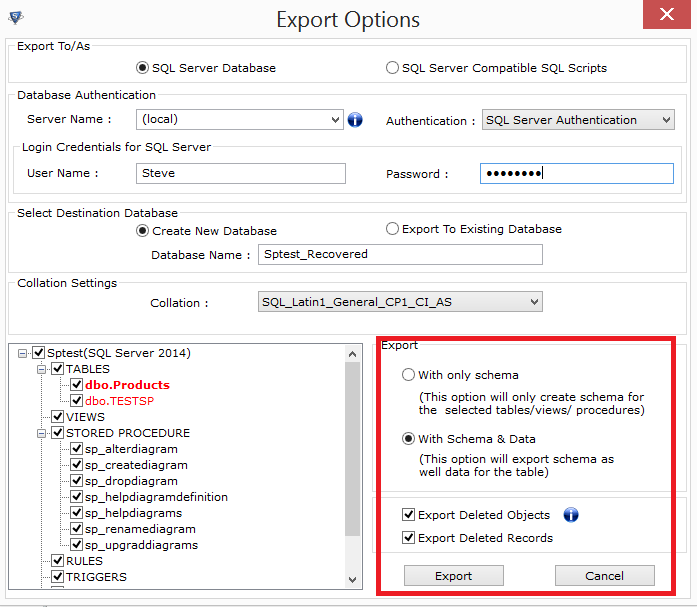
- Select Export and save the objects to a SQL Server database, to SQL scripts or to CSV files.
What Are the Software and System Specifications of SQL Recovery?
Check both tables before you install SQL Recovery on the server or on a separate workstation.
Software Specifications
| Attribute | Detail |
|---|---|
| Software name | SQL Recovery |
| Version | 14.0 |
| File types | MDF and NDF |
| SQL Server versions | 2025, 2022, 2019, 2017, 2016, 2014, 2012, 2008 R2, 2008, 2005 and 2000 |
| Scan modes | Quick Scan and Advanced Scan |
| Export options | SQL Server database, SQL scripts and CSV |
| SQL Server installation | Needed only for export to a live server |
| Demo limit | Preview of every item and export of 25 records per table and 5 other objects |
System Specifications
| Component | Requirement |
|---|---|
| Processor | Intel Core 2 Duo E4600 at 2.40 GHz or equivalent |
| RAM | 4 GB |
| Hard disk space | 100 MB free |
| Operating system | Windows 7, 8 and 10 (32 or 64 bit), Windows 11 (64 bit), Windows Server 2008, 2012 R2, 2016, 2019, 2022 and 2025 |
| Framework | Microsoft .NET Framework 4.5 or later |
| Permission | Launch SQL Recovery as administrator |
Frequently Asked Questions
Does Error 823 Always Mean the Database Is Corrupt?
No. Windows reports a failed I/O call and says nothing about your pages yet. Execute DBCC CHECKDB to learn whether any page is damaged.
Is Error 824 the Same as Error 823?
No. Windows finds the fault in error 823. In error 824 the I/O succeeds and SQL Server finds a bad page through a checksum or torn page check.
Can You Ignore Error 825?
No. Error 825 means an I/O call failed and passed on retry. Your disk is already unreliable and error 823 follows when retries fail.
Does Restarting SQL Server Fix Error 823?
No. Restarting repeats the same I/O calls on the same storage. Fix the disk or the driver first.
Can You Restore a Single Page Instead of the Database?
Yes. Use RESTORE DATABASE with the PAGE option. You need the full or bulk logged recovery model and an unbroken log backup chain.
Does REPAIR_ALLOW_DATA_LOSS Fix Error 823?
No. Repairs remove damaged data and keep the faulty disk in service. Fix the storage and restore from backup instead.
How Do You Prevent Error 823?
Set page verify to CHECKSUM and execute DBCC CHECKDB every week. Update drivers and firmware and exclude database files from antivirus scans.
Final Words on SQL Server Error 823
Errors 823, 824 and 825 warn you about storage trouble before you lose data. Check the damaged pages, fix the disk path and restore from backup.
Copy the database files to a healthy disk before any repair and store verified backups of every database.
Key Takeaways
- Error 823 means Windows failed a page I/O call and error 824 means SQL Server found a bad page.
- Error 825 is an early warning that needs the same investigation.
- Fix the disk and driver fault before any repair.
- Page restore and full restore bring back a clean database and SQL Recovery exports the data when no backup exists.
Next Read