
Fix SQL Server Error 5171 (MDF Is Not a Primary Database File)
Error 5171 appears when you attach a database and SQL Server rejects the file as invalid. Its message reads “MDF is not a primary database file” and the attach stops at once.
Most cases come from a wrong file selection or a damaged file header. This guide explains the causes and five fixes in the order that protects your data.
Quick SummaryError 5171 means the MDF is not a primary database file. Check that you selected the primary data file. Attach every file of the same database. Test the file header with DBCC CHECKPRIMARYFILE. Replace a half copied file with a fresh copy. Restore a verified backup when the header is damaged. Use SQL Recovery when no backup exists. Copy the files before any repair.
What Causes Error 5171 in SQL Server?
SQL Server reads the header page of the file you select and checks that it describes a primary data file. Error 5171 means that check failed. SQL Server stores the message text in sys.messages as “%.ls is not a primary database file.”
- Wrong file selected. You selected an NDF file or another secondary file in the Attach Databases window.
- Damaged file header. A disk fault, a power cut or a virus damaged the first pages of the MDF file.
- Wrong file type. The file is a renamed backup or a half copied file and not a database file.
- Incomplete copy. The copy stopped before it finished so the file is smaller than the original.
Do You Know?Extensions prove nothing. Sales.mdf can be a secondary file and a primary file can have any extension. SQL Server checks the header and ignores the name.
How to Check the File Before You Attach It?
Check the file size and the header first. Compare the copied file with the original and open the header with DBCC CHECKPRIMARYFILE. Microsoft does not document this command so use it only on a copy of the file.
-- 0 returns 1 when the file is a valid primary file
DBCC CHECKPRIMARYFILE (N'D:\Recovery\SalesDB.mdf', 0);

-- 3 lists the files stored in the header
DBCC CHECKPRIMARYFILE (N'D:\Recovery\SalesDB.mdf', 3);
Option 0 returns 1 and option 3 lists the files when the header is valid. Errors or empty results point to Method 4 or Method 5.
How to Fix MDF Is Not a Primary Database File?
Try the methods in this order. Every example uses the database SalesDB and the folder D:\Recovery. Replace the names with your own values.
Method 1: Select the Primary File and Attach All Files
Open SSMS and right click Databases. Select Attach and Add and browse to the file that carries the database name. Microsoft states that FOR ATTACH needs all data files and all log files to be available. Add the NDF and LDF files in the same window.
CREATE DATABASE SalesDB
ON (FILENAME = N'D:\Recovery\SalesDB.mdf'),
   (FILENAME = N'D:\Recovery\SalesDB_2.ndf'),
   (FILENAME = N'D:\Recovery\SalesDB_log.ldf')
FOR ATTACH;
Compare the file list with attach vs restore database in SQL Server when you are not sure which method fits.
Method 2: Replace the File With a Fresh Copy
Copy the MDF file again from the source server when the first copy is smaller than the original. Stop the SQL Server service or detach the source database before you copy. Copies of open files come out damaged.
EXEC sp_detach_db @dbname = N'SalesDB';
-- copy the MDF, NDF and LDF files to D:\Recovery
-- then attach the files with the command from Method 1
Method 3: Attach With a Rebuilt Log File
Use this method when the data files are valid and only the log file is missing. Microsoft states that ATTACH_REBUILD_LOG needs a clean shutdown of the database and all data files. SQL Server creates a new log file of 1 MB and the log backup chain breaks.
CREATE DATABASE SalesDB
ON (FILENAME = N'D:\Recovery\SalesDB.mdf')
FOR ATTACH_REBUILD_LOG;
Heads UpTake a full backup of the new database at once because the old log backups no longer apply. Never attach files from an unknown source on a production server. Microsoft advises a DBCC CHECKDB check on a test server first.
Method 4: Restore the Last Good Backup
Restore the database from backup when the file header is damaged. Verified backups are the safest answer because they bring back a consistent database. Follow restore database with NORECOVERY when you need differential and log backups too.
RESTORE VERIFYONLY FROM DISK = N'D:\Backups\SalesDB_Full.bak';

RESTORE DATABASE SalesDB
FROM DISK = N'D:\Backups\SalesDB_Full.bak'
WITH REPLACE, RECOVERY, STATS = 10;
Plan your backups with backup and restore strategy for SQL Server so the next failure ends here.
Method 5: Repair the MDF File With SQL Recovery
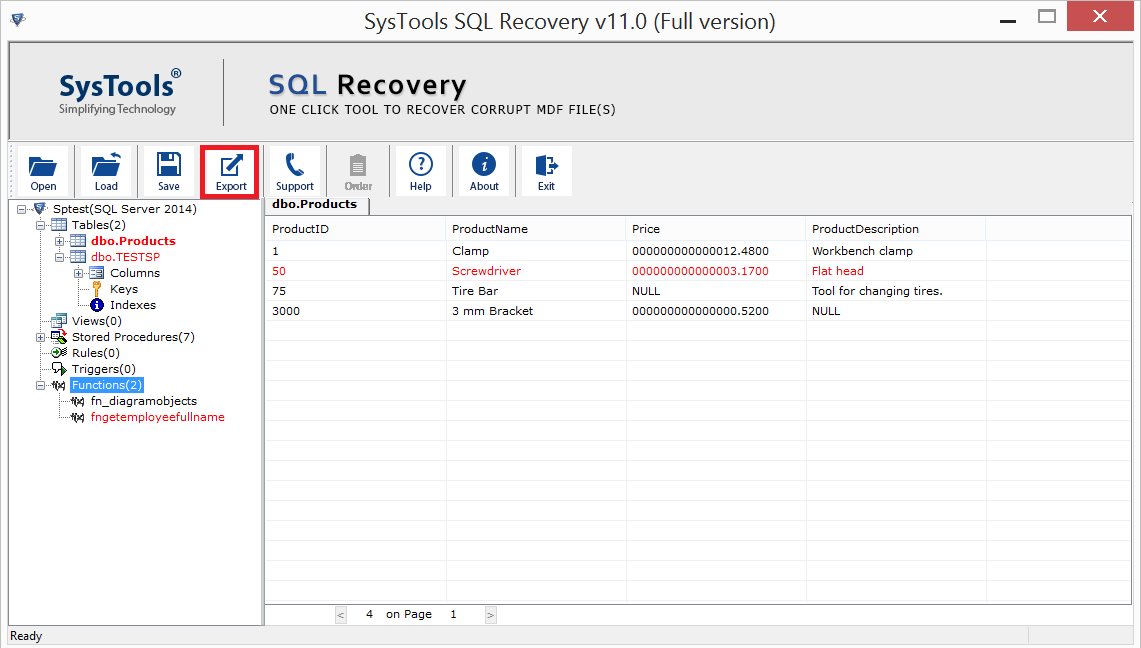
Use this method when no backup exists and Methods 1 to 4 fail. SQL Recovery reads the MDF and NDF files without SQL Server and skips the header check that causes error 5171. SQL Recovery previews the tables, views, triggers, rules, functions and stored procedures and exports them. These steps follow the same flow as recover a corrupt MDF file.
Download SQL Recovery Buy SQL Recovery
- Install SQL Recovery and select Add File.
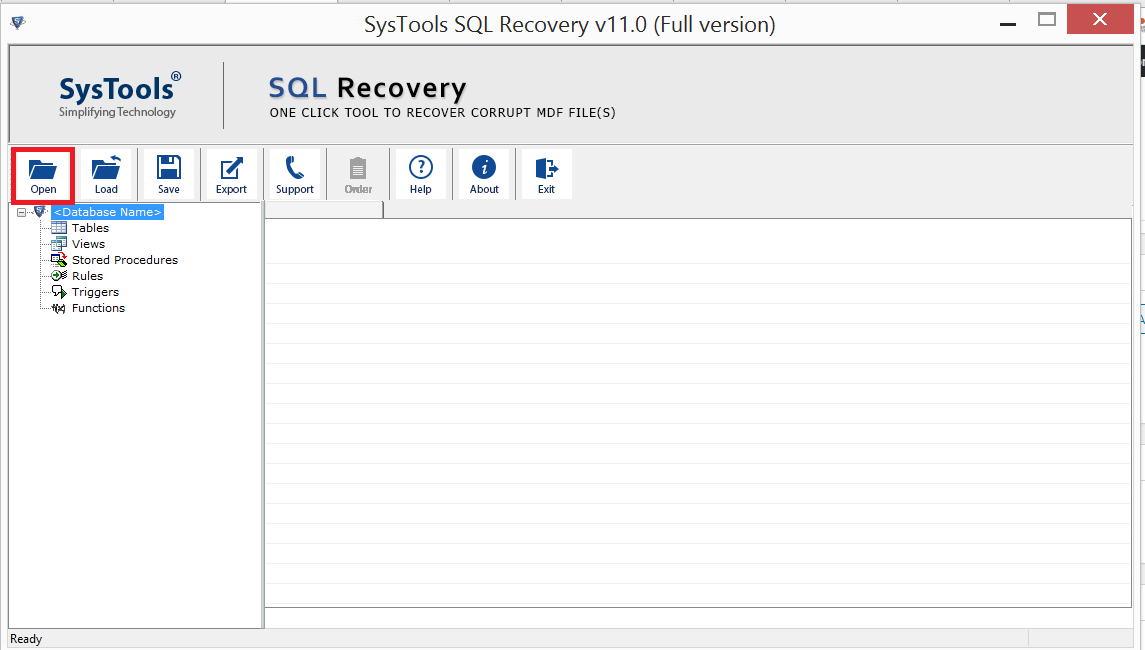
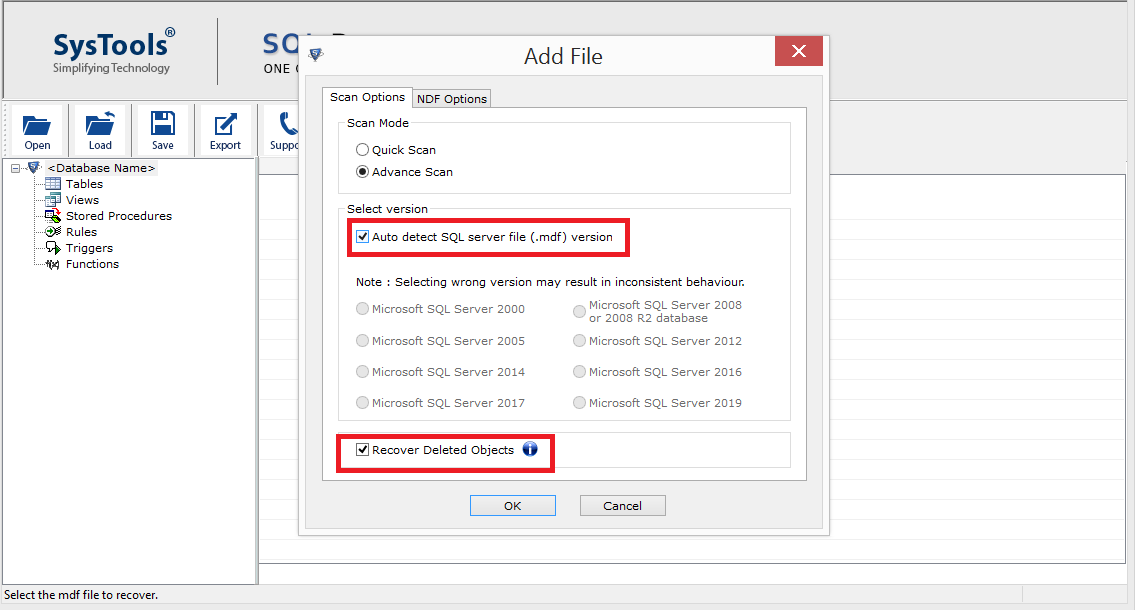
- Browse to the MDF file and select Advanced Scan. Confirm the SQL Server version and tick the deleted records option.
- Open the preview and check the recovered database components.
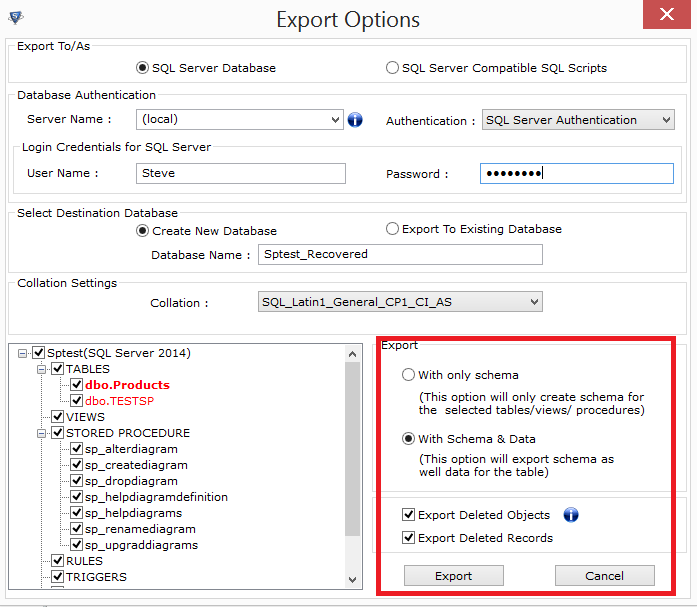
- Select Export and save the objects to a SQL Server database, to SQL scripts or to CSV files.
What Are the Software and System Specifications of SQL Recovery?
Check both tables before you install SQL Recovery on the server or on a separate workstation.
Software Specifications
| Attribute | Detail |
|---|---|
| Software name | SQL Recovery |
| Version | 14.0 |
| File types | MDF and NDF |
| SQL Server versions | 2025, 2022, 2019, 2017, 2016, 2014, 2012, 2008 R2, 2008, 2005 and 2000 |
| Scan modes | Quick Scan and Advanced Scan |
| Export options | SQL Server database, SQL scripts and CSV |
| SQL Server installation | Needed only for export to a live server |
| Demo limit | Preview of every item and export of 25 records per table and 5 other objects |
System Specifications
| Component | Requirement |
|---|---|
| Processor | Intel Core 2 Duo E4600 at 2.40 GHz or equivalent |
| RAM | 4 GB |
| Hard disk space | 100 MB free |
| Operating system | Windows 7, 8 and 10 (32 or 64 bit), Windows 11 (64 bit), Windows Server 2008, 2012 R2, 2016, 2019, 2022 and 2025 |
| Framework | Microsoft .NET Framework 4.5 or later |
| Permission | Launch SQL Recovery as administrator |
Frequently Asked Questions
Does Error 5171 Mean the MDF File Is Corrupt?
No. Wrong file selection causes many cases. Check the header with DBCC CHECKPRIMARYFILE before you assume damage.
Can You Attach an NDF File Alone?
No. SQL Server needs the primary file to start the attach. Select the MDF file and add the NDF files in the same window.
Does Renaming the File Fix Error 5171?
No. SQL Server reads the header and ignores the name. Renamed files carry the same header and the same error.
Can You Attach an MDF File Without the LDF File?
Yes. Use FOR ATTACH_REBUILD_LOG when the database closed cleanly. SQL Server builds a new log file and breaks the log backup chain.
Is Error 5171 the Same as Error 5172?
No. Error 5171 names a file that is not a primary file. Error 5172 reports a file header that is not valid.
Can You Fix Error 5171 Without a Backup?
Yes. Copy the file again or attach it with a new log. Use SQL Recovery to export the data when the header is damaged.
How Do You Prevent Error 5171?
Detach the database or stop the service before you copy files. Store verified backups and compare every copy with the original size.
Final Words on SQL Server Error 5171
Error 5171 comes from a wrong file selection or a damaged header. Check the file with DBCC CHECKPRIMARYFILE and attach the right file with its companions.
Restore from backup when the header is damaged and export the data with SQL Recovery when no backup exists.
Key Takeaways
- Error 5171 means SQL Server rejected the header of the file you attached.
- Select the primary file and add every NDF and LDF file.
- Copy the files before any repair and verify the copy size.
- SQL Recovery exports the data when no backup exists.
Next Read